What Filling-In of Small Reversed-Out Type Looks Like
Filling-in of reversed-out type is when the spaces between strokes are filled with ink. With characters that have counters, such as 8, 0, and 4, you may not notice it at first. The character is still there, but the counters are gone—this is a failure. It is different from halation: halation adds a ring around the outside of the character, while filling-in fills in the white inside the character. First reduce ink and pressure; do not make the type bolder to compensate.
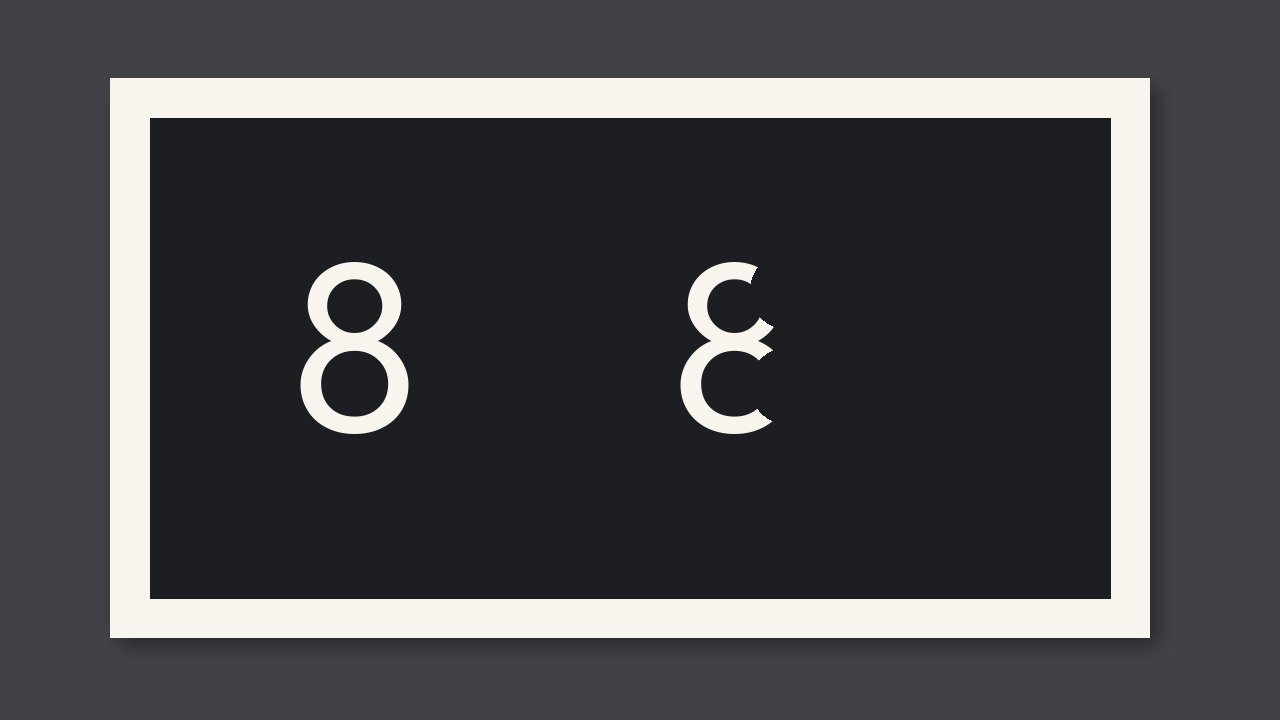
Fill-in in reversed-out type is when the gaps between strokes are filled with ink; characters with counters such as 8, 0, and 4 are the first to lose theirs. The character is still there, but the counters are gone—this is unacceptable. It differs from halo: halo adds a ring around the outside of the character, while fill-in fills in the white inside the character. First reduce ink and pressure; do not make the type bolder to compensate.
What Counts as Fill-In
Reversed-out type relies on the surrounding solid to keep the character shape open. When ink volume or pressure is too high, the open strokes become thinner and the counters close first. Under magnification, the counters are no longer the paper’s original color, but the same ink as the surrounding solid, or only a slit remains. From a distance, the character still looks like that letter, so if you only inspect the whole page, it will pass.
For reversed-out type smaller than 6 pt, and any batch number that regulations require to be legible, stop as soon as a counter closes. For reversed-out type in large headlines, if the counters are still open and only the strokes are slightly thin, you may compare with the approved proof; if the counters were open on the approved proof and are now closed, it is also unacceptable.
Distinguish It from Halo and Plate Plugging
| Symptom | Location | Action |
|---|---|---|
| Character counters are filled with ink | Inside the character | Reduce ink and pressure |
| A pale ring appears around the outside of the character | Outside the character | Reduce pressure as for halo |
| Only one or two characters have filled counters; other characters are open | Same characters | Check whether those characters on the plate are already plugged |
Do This First This Round
- Use a magnifier to look at the counters of 8, 0, A, and 4; do not look at the line with the largest type size.
- If a counter is closed, reduce the ink and pressure for that color; after reducing, inspect the same set of characters again.
- If the counters are still closed after reducing to the level of the approved proof, the problem is with the plate or the file; do not print the surrounding solid lighter on press to compensate.